Deploying an EVM archive
A DevOps playbook for standing up a self-hosted SQD archive for an EVM chain —
using etherlink-archive-previewnet as the worked example.
What you get. An archive is a fast, queryable, compressed copy of an EVM chain's whole history — columnar and batch-queryable, so an indexer can backfill the full chain in one pass instead of paging it over RPC.
How to reuse this. The stack below is identical for any EVM runtime. To bring up a new chain you change a handful of values (node URL · hostnames · dataset · first block) and deploy — everything else stays the same.
1What an archive is
The stack is three small services sharing one data volume. You don't need to know their internals — just what each one is for:
- ingest — pulls blocks from the chain's RPC node and writes them to the volume as compressed chunks.
- worker — serves the actual data queries out of those chunks.
- router — the public entry point. It tells clients how far the archive has synced
(its height) and where to send queries. This is the one service that is our own image
(
ghcr.io/baking-bad/archive-router-local); ingest and worker are upstreamsubsquid/*images.
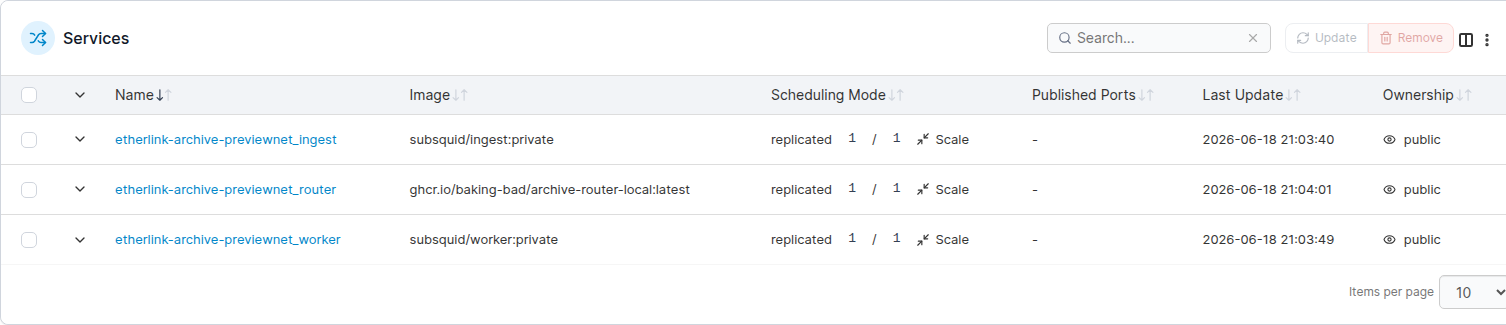
1/1 replicas. Only
router runs our image; ingest and worker are the upstream subsquid images.2What you configure per chain
These are the values that change when you point the stack at a different EVM runtime. Everything else in the compose file is boilerplate you can leave untouched.
Each row is a variable the compose file substitutes, and the exact
ingest/worker flag or traefik label it lands in — so you can trace it straight
into docker-compose.yml.
| Variable | Where it lands (real compose flag / label) | Example (previewnet) |
|---|---|---|
ETHERLINK_NODE_URL |
ingest -e — the EVM node to pull blocks from |
https://evm.previewnet.tezosx.nomadic-labs.com |
FIRST_BLOCK |
ingest --first-block; also read by the router as the archive's start block |
0 |
ENDPOINT_CAPACITY · RPS_LIMITBATCH_LIMIT · WRITE_CHUNK_SIZE |
ingest -c · -r · --batch-limit · --write-chunk-size — throttle to the node's capacity |
20 · 25090 · 500 |
WORKER_DIR |
ingest --dest — where chunks are written. The dataset is the chain's id (the string
consumers query); DATA_DIR + / + its base64url encoding:
printf shadownet | basenc --base64url | tr -d '=' → c2hhZG93bmV0 |
/data/worker/c2hhZG93bmV0 |
DATA_DIR |
the router scans this dir for every dataset folder under it — same shared volume as WORKER_DIR |
/data/worker |
ROUTER_URL |
worker --router — internal Swarm DNS the worker pings |
http://…_router:5000 |
WORKER_URL |
worker --worker-url + router fallback — the worker's bare
public base; the router appends /query itself |
https://…-worker.dipdup.net |
ROUTER_EXTERNAL_HOSTWORKER_EXTERNAL_HOST |
traefik Host() rule → the public URLs. Indexers point at the router host (see below) |
etherlink-archive-previewnet.dipdup.net |
ROUTER_TRAEFIK_SERVICEWORKER_TRAEFIK_SERVICE |
names for the traefik service/router labels — must be unique per stack | …-subsquid-router |
NODE_HOSTNAME |
Swarm placement constraint — pins all three services to one node | 25mm |
In Portainer these live in the stack's Environment variables section (the same names the compose file substitutes). To stand up a new chain, copy the stack and change just the rows above:
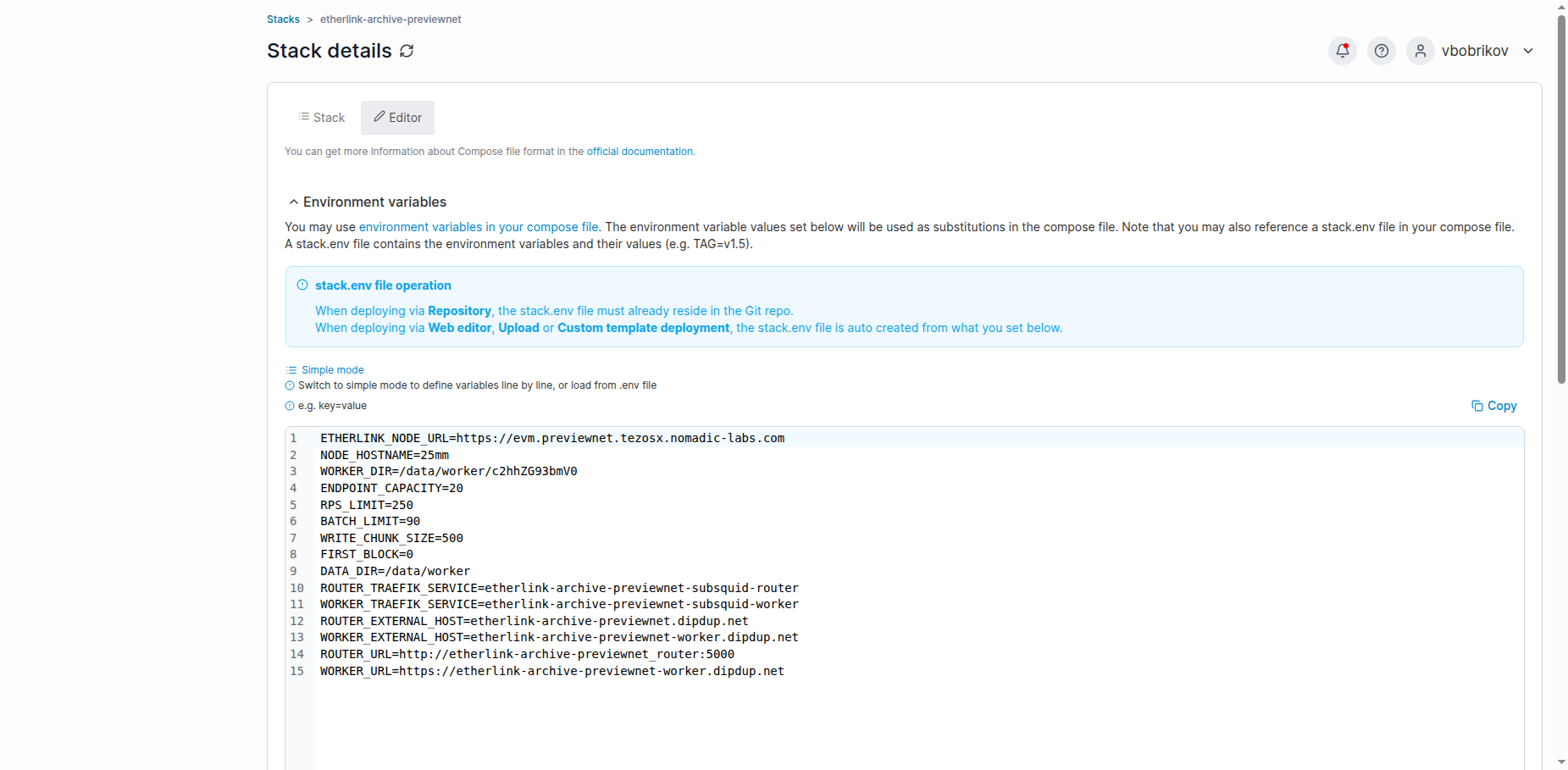
what consumers point at
An indexer (DipDup, an explorer, …) sets each index's archive URL to the
router's external host plus the dataset name —
https://<ROUTER_EXTERNAL_HOST>/<dataset>, e.g.
https://etherlink-archive-previewnet.dipdup.net/shadownet. That one URL is the whole public
interface of the archive; everything else in the table above is internal plumbing.
3Verify & troubleshoot
After deploying, check the router over HTTP — no browser needed. A healthy archive reports a rising height:
curl https://<ROUTER_EXTERNAL_HOST>/height     # a number that grows; e.g. 800032
curl https://<ROUTER_EXTERNAL_HOST>/datasets   # the chain(s) served, e.g. ["shadownet"]
Height climbs as ingest writes more blocks. A brand-new archive starts low and
catches up to the chain tip over time.
Common gotchas
- Router runs the wrong server. The
routerservice must declareentrypoint: "uvicorn router.app:app --host 0.0.0.0 --port 5000". Its base image would otherwise start an old Flask server — you'd lose the live-height fix this image exists for. (Copying an existing stack already has this; don't drop it.) /heightstays at0. The router hasn't heard from the worker yet, or ingest isn't writing where the router looks. Check thatWORKER_DIRsits underDATA_DIRon the same shared volume, and thatingestis running and reaching the node.- Queries 404 / hit the wrong URL.
WORKER_URLisn't the worker's bare base — check the env table; the router appends/queryitself. - Image pull denied. All three images are private. The router is
ghcr.io/baking-bad/archive-router-local; thesubsquid/ingest:privateandsubsquid/worker:privateimages live in our GHCR too (sameghcr.iocredentials, rebuildable from the archives repo if missing) — make sure Portainer has that registry configured. - Service won't start / "no suitable node". The
NODE_HOSTNAMEplacement constraint doesn't match a node in the Swarm. Set it to a real node hostname.
Companion files in this folder: docker-compose.yml
(the full stack), .env.example (all variables to fill in), and README.md
(a short runbook for standing up a new chain). Source of truth lives in the deployments repo at
stacks/etherlink-archive/.